BLW Meals: Starting Solids
- 3.4
- Rating
- 100.00K
- Installs
- Free
- Price

 Analysis by App-foxy
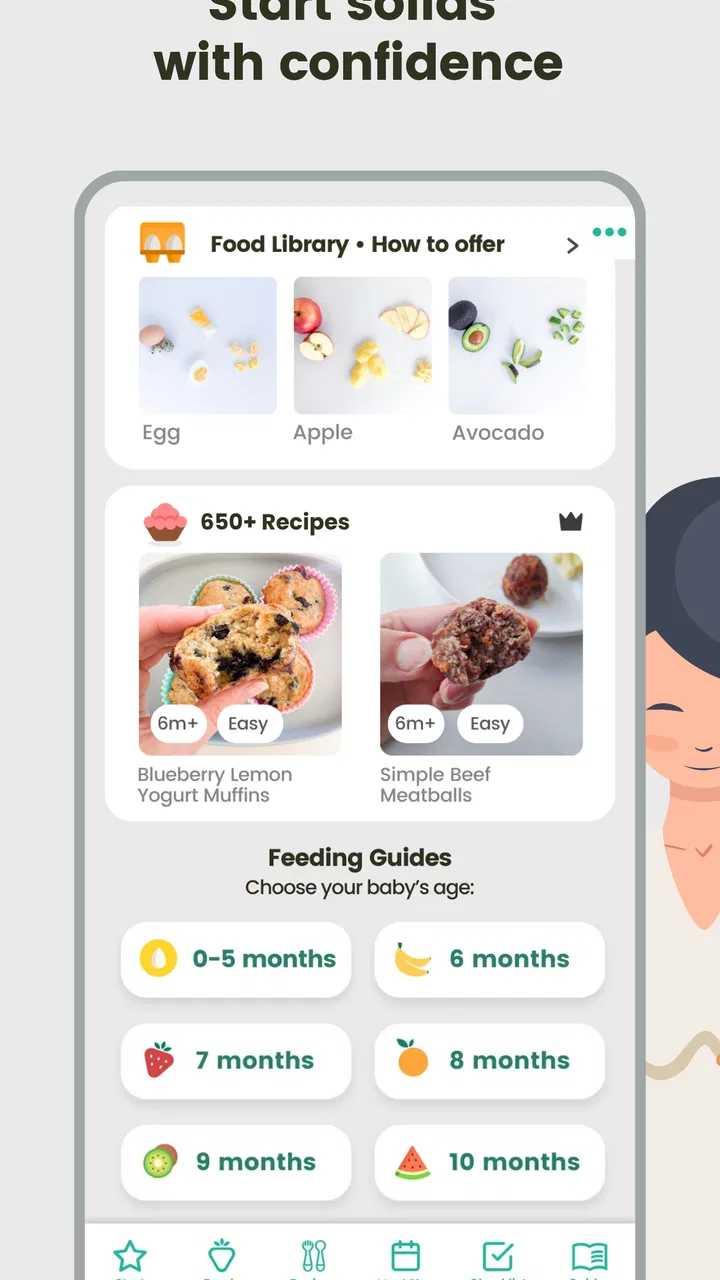
Starting solids can feel like a small milestone with an unexpectedly large amount of planning attached to it. I found BLW Meals: Starting Solids most useful when I treated it as a practical companion for deciding what to offer next, rather than as a complete replacement for professional feeding advice. It is a free parenting app from BLW SOCIAL, focused on baby-led weaning, meal ideas, allergen guidance, planning, and tracking. The basic appeal is easy to understand: instead of searching through scattered notes, saved posts, and recipe pages, I could keep several parts of the early-feeding routine in one place.
The app has a 3.4 average from around 400 ratings, and it has passed 100,000 installs. Those figures suggest a real audience, but also a mixed experience rather than universal approval. That matches my impression. The app can make the first week feel less intimidating, especially for a parent who wants structure without building a spreadsheet. At the same time, its lasting value depends on whether you enjoy using a dedicated guide every day. If you only need a few safe meal ideas, a pediatrician’s advice and a small collection of trusted recipes may be simpler.
What the first week feels like
The strongest part of the experience is the way the app gives shape to a vague task. “Start solids” is not one decision; it quickly becomes a sequence of choices about food, preparation, allergens, timing, and what to remember afterward. A feeding guide can turn that sequence into smaller steps. I found that especially helpful on busy mornings, when I wanted an idea that matched the baby’s stage instead of spending time browsing general recipes.
You May Also Like

 Blood Strike: 2.5 Anniversary
Blood Strike’s Loadouts Turn Every Drop Into a Tactical Gamble
A close look at Blood Strike’s custom loadouts: how fast access to signature weapons reshapes its battle royale rhythm, rewards preparation, and narrows the gap between fights.

 Pandora - Music & Podcasts
Pandora’s Music Is Easy to Start, but Harder to Recover
Pandora’s strength is its low-effort path from a seed to a station. Its weak spot is how much confidence it asks you to place in connection, setup, and quiet recovery.

 8 Ball Pool
 Is Built on Rivalries, Rematches, and Routine
A close look at the rivalries, rematches, shared routines, and unanswered safety questions that turn a quick pool match into a persistent mobile community.

 Samsung Music
’s Quiet Strength Is Playing What You Already Own
Its reach comes less from spectacle than from dependable access to a personal library. That simplicity is both the app’s strongest retention engine and its ceiling.

 AccuWeather: Weather Radar
AccuWeather Review: A Quick, Clear Forecast for Everyday Decisions
For everyday plans, the best forecast is the one you can understand quickly. AccuWeather makes rain timing, radar, and local conditions easy to act on, with a few trade-offs.

 Hill Climb Racing
Why Hill Climb Racing Still Turns Crashes Into One More Run
A tiny car, a bumpy hill and one more upgrade: Hill Climb Racing keeps resurfacing because its simple chaos makes every near-miss feel personal.
More From Our News Desk



The meal-planning element is more valuable than it first appears. A recipe by itself may sound useful, but a plan helps answer the question parents actually face: what can I offer over the next several meals without repeating the same narrow group of foods? The app’s recipes and meal ideas are therefore best used as prompts. I would look through them before shopping, choose a few realistic options, and then adapt the preparation to what was already in the kitchen.
The allergen guidance is another reason the app feels reassuring during the first week. It encourages a more deliberate approach than casually introducing many unfamiliar foods at once. I would still follow advice from a healthcare professional, particularly where a baby has eczema, an existing allergy, or a family history of food allergy. The app can help me remember what I intended to introduce, but it should not be treated as a diagnosis tool or an emergency reference.
One practical habit made the tracker more useful: I would record an introduction immediately after the meal rather than promising myself I would remember it later. That small change matters because the early days blur together. A tracker is only helpful when entries are timely enough to be trusted. Used this way, it can reduce the mental load of remembering which foods were offered and when.
The first-week appeal also comes from reducing decision fatigue. I did not need to invent a new menu from scratch every time. I could use one suggested meal as a starting point, replace an ingredient that was unavailable, and keep the overall idea. This is a better use of the app than following every suggestion rigidly. Babies vary, household schedules change, and a plan that looks sensible on a screen may be impractical when the family is tired.
There is an important trade-off here. A guided app can make a nervous parent feel prepared, but it can also make feeding seem more complicated than it needs to be. The presence of a tracker, allergen notes, recipes, and plans may encourage over-recording. During the first week, that structure is comforting. After the novelty fades, the same structure needs to prove that it saves more time than it consumes.
Using recipes without turning them into extra work
I would not approach the recipe section as a demand to cook a separate, polished meal for the baby. Its better role is to provide combinations and preparation ideas that can fit around ordinary family food. Before opening the app, I would check what the household was already planning to eat, then look for a way to make an appropriate portion or component available to the baby. That workflow makes the app more sustainable than treating every recipe as a new cooking project.
A useful detail is to judge a suggestion by preparation effort before committing to it. A recipe may be appealing but unsuitable for a weekday when there is no time for multiple steps. I found it more realistic to save the more involved ideas for days with extra time and rely on simpler suggestions on workdays. This is where the app’s value depends less on the number of recipes and more on how selectively I use them.
Parents also need to consider texture, choking hazards, portion suitability, and supervision independently. A recipe name or meal suggestion cannot make those decisions for a particular child. I would prepare food according to current guidance and the baby’s development, and I would avoid interpreting the app as permission to introduce something that a clinician has advised against.
Why the app may still matter after the first month
The first month is when the app has the clearest chance to become a habit. Once the initial uncertainty decreases, I would expect its value to shift from “tell me what to do” toward “help me keep variety and remember what happened.” That is a more durable role. A meal plan can prevent the same two or three familiar foods from appearing repeatedly, while the tracker can provide a quick record when I need to think back over recent introductions.
Month-to-month usefulness also depends on changing how the app is used. In the beginning, I would consult the feeding guide frequently. Later, I would use it more like a reference shelf: check an allergen tip before an introduction, browse recipes when the menu feels repetitive, and review the tracker when planning the next shopping trip. This lighter rhythm is more realistic than opening the app for every meal indefinitely.
The app is particularly well suited to parents who like visible progress. Recording foods can make a gradual process feel manageable, and a plan can provide a sense of direction when advice from different sources feels overwhelming. It may also help two caregivers stay aligned if both use the same record rather than relying on memory or separate notes.
That said, the tracker does not automatically create useful long-term information. If entries become inconsistent, the record may give a false sense of completeness. I would keep notes concise and consistent, using the same style each time. For example, I would record the food and any relevant observation rather than writing a long account that becomes difficult to maintain. The goal is a dependable memory aid, not a diary that takes longer than the meal.
One non-obvious strength is that the app can act as a bridge between planning and reflection. A recipe list alone helps before shopping, and a tracker alone helps afterward. When both are used together, I can look at what was offered, notice where variety is lacking, and choose the next meal with that in mind. That loop is more valuable than either feature in isolation.
The app is less compelling for a parent who already has a well-organized feeding system. If I already have a trusted meal rotation, a written allergen log, and advice from a healthcare professional that I understand, adding another place to record information may create duplication. In that situation, the app would need to offer enough convenience in its recipes or planning to justify the extra routine.
Where recurring value starts to weaken
Any parenting tool has to earn its place repeatedly, because parents have limited attention. The free entry point makes trying the app straightforward, but in-app purchases range from $4.99 to $34.99 per item. That means I would spend time with the available experience before paying for anything. A purchase is easier to justify when it clearly removes a recurring obstacle, such as planning meals or finding suitable ideas, rather than simply adding more content to browse.
The app’s current version is 1.0.160, and it requires at least iOS 11. For a parent choosing a tool today, compatibility is worth checking before building a routine around it. The age rating is Everyone, which fits its family-oriented purpose, but that rating should not be confused with medical suitability for every child. Feeding decisions still need to reflect the child’s age, development, and individual circumstances.
The developer, BLW SOCIAL, has chosen a focused category rather than trying to cover every aspect of parenting. That focus is helpful when I want baby-led-weaning material, but limiting when I need broader support such as sleep, growth, or detailed clinical guidance. I would keep it alongside, not instead of, advice from a pediatrician or other qualified professional.
The maintenance burden in everyday family life
The biggest question is not whether the app is useful on a calm weekend. It is whether I can keep using it on a rushed Tuesday. Planning sounds simple until shopping, preparation, feeding, cleaning, and work all compete for attention. The app reduces some planning friction, but it cannot remove the practical work of buying food, preparing it safely, supervising the meal, and cleaning afterward.
My preferred routine would be a short weekly planning session rather than repeated browsing throughout the day. I would choose a handful of meal ideas, make a shopping note, and decide which foods need special attention. During the week, I would use the tracker immediately after relevant meals. This keeps the app from becoming another constant notification-like obligation, even if the app itself does not need to be opened for every decision.
A second useful workflow is to separate “ideas” from “commitments.” I would browse freely, but only add meals to the actual plan when I know the ingredients and preparation fit the family schedule. This avoids the common trap of creating an ambitious plan that looks good on Sunday and feels impossible by Wednesday. The app works better as a flexible menu board than as a strict timetable.
There is also a social maintenance issue. If only one caregiver records everything, the information may become incomplete when that person is away or exhausted. Agreeing on a simple shared habit—such as recording new foods and notable reactions in the same place—can make the tracker more dependable. If the household will not maintain that habit, a simpler shared note may be more practical.
I would also avoid measuring success by how completely I use every section. The guide, recipes, allergen tips, meal plan, and tracker are separate tools. A parent may gain real value from only two of them. Trying to use all of them at once can turn a helpful app into homework. The best long-term setup is the smallest routine that solves the family’s actual problem.
What causes fatigue after the novelty fades
The first source of fatigue is repetition in the act of browsing. Even good meal ideas lose their charm if I must repeatedly search, compare, and decide. That is why planning in batches matters. If the app becomes something I open only when I am already hungry, rushed, and out of ideas, its guidance may feel like another decision rather than a solution.
The second is overtracking. Recording every detail can make parents feel responsible for maintaining a perfect history. I would use the tracker for information that will affect a future decision: new foods, allergen introductions, or observations worth discussing with a professional. I would not turn ordinary meals into a long administrative task.
The third is the gap between an attractive plan and the child’s behavior. A baby may reject a food, eat very little, or be too tired for the planned meal. A rigid schedule makes that feel like failure. I found the app more useful when I treated its suggestions as options and kept a backup meal available. Flexibility is not a flaw in the plan; it is part of making the plan survive real family life.
There is also the risk of confusing organization with reassurance. A neatly recorded meal does not prove that a food is appropriate for a particular child, and an allergen tip does not replace urgent medical guidance. Parents who want clinical certainty should choose professional advice first. Parents who want help organizing everyday choices are more likely to appreciate this app.
Finally, paid content can affect the feeling of continuity. Because individual in-app purchases sit between $4.99 and $34.99, I would be cautious about paying simply because I had already invested time in the free material. I would first identify the exact recurring problem I want solved, then decide whether the purchase addresses it. That approach prevents the app from becoming an expensive collection of unused meal ideas.
My long-term verdict on BLW Meals: Starting Solids
I think BLW Meals: Starting Solids earns a place on a parent’s phone when the main need is practical organization during the transition to solid foods. Its combination of feeding guidance, meal ideas, allergen-focused tips, planning, and tracking gives it more day-to-day usefulness than a basic recipe collection. I especially like it for the first several weeks, when remembering what was offered and deciding what comes next can feel harder than the cooking itself.
Its lasting value is more conditional. The app works best when I use it lightly and deliberately: plan a few realistic meals, consult guidance before unfamiliar introductions, and record only information that will be useful later. It becomes tiring when I try to follow every suggestion, log every detail, or treat the plan as a fixed rulebook.
I would recommend it to a first-time parent who wants a focused baby-led-weaning companion and does not yet have a comfortable system. I would also recommend trying it to families who are stuck in a narrow food rotation and want fresh ideas without searching across many websites. On the other hand, I would skip it if I already have a trusted feeding plan, dislike tracking, or need medical advice rather than meal organization.
The free price makes experimentation easy, while the in-app purchase range means I would delay spending until the routine has proved useful. The Everyone rating and support for iOS 11 or later make it approachable for many households, but neither removes the need for safe preparation, supervision, and individualized professional guidance.
My final judgment is positive but measured: this is a helpful planning and memory tool, not a substitute for judgment. It earns lasting space when it reduces the number of decisions I have to make, not when it gives me more tasks to complete. If I keep the workflow short and flexible, it can remain useful well beyond the excitement of the first week.
FAQs for BLW Meals: Starting Solids
01What is BLW Meals: Starting Solids, and who is it for?
BLW Meals: Starting Solids is a comprehensive app designed for parents who are beginning the baby-led weaning (BLW) process with their infants. It offers guidance, meal plans, and recipes tailored for babies starting solid foods. The app is perfect for new parents seeking structured support and ideas to ensure their child receives balanced nutrition during this crucial developmental stage.
02What features does BLW Meals: Starting Solids offer?
The app provides a variety of features, including daily meal plans, nutritional information, and step-by-step recipes. It also offers tips on introducing allergens safely, tracking your baby's food preferences, and sharing experiences with a community of parents. These features make it a valuable tool for anyone navigating the early stages of solid food introduction.
03How user-friendly is the BLW Meals app for new parents?
BLW Meals: Starting Solids is designed with user-friendliness in mind. The interface is intuitive, with easy navigation and clear instructions, making it accessible even for tech-challenged users. The app's layout allows parents to quickly find meal ideas and information, saving time and reducing stress during meal preparation.
04Does BLW Meals: Starting Solids support multiple dietary needs?
Yes, the app accommodates various dietary needs and preferences, including vegetarian, vegan, and allergy-safe options. It provides recipes and meal plans that can be customized to suit individual dietary restrictions, ensuring that parents can confidently introduce solids to their baby while adhering to specific nutritional requirements.
05Is there a community or support feature within the BLW Meals app?
The app includes a community feature where parents can connect with others going through similar experiences. Users can share tips, ask questions, and provide support for one another. This aspect of the app is particularly beneficial for new parents seeking advice and reassurance from a like-minded community during the weaning journey.
Pros
- User-friendly interface for easy navigation.
- Includes a variety of healthy recipes.
- Customizable meal plans for dietary needs.
- Offers nutritional information for each meal.
- Supports offline access to recipes.
Cons
- Limited free content; subscription required.
- No integration with grocery delivery apps.
- Lacks video tutorials for meal preparation.
- Not all recipes have allergen information.
- App updates can be infrequent.

BLW Meals: Starting Solids
Gallery